

Dice rolls are set-up to be used within posts. The post and/or thread would need to be created first, to open the roller look to the bottom right of the post. There you will see a "More Options" link, click or hover over it. Now you will be given the option to "Roll a Dice" or "Choose an Option" in the drop down

You'll then be presented with a new option screen. Here you can set up the many sides of your dice and for what you will be rolling for.
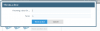
To roll more dice click on the "Throw another dice" button. You'll be able to throw as many as you need within the window. To roll a different action just repeat the previous steps and input what you are rolling for.
The dice are non-editable to combat cheating and such.
You'll then be presented with a new option screen. Here you can set up the many sides of your dice and for what you will be rolling for.
To roll more dice click on the "Throw another dice" button. You'll be able to throw as many as you need within the window. To roll a different action just repeat the previous steps and input what you are rolling for.
The dice are non-editable to combat cheating and such.
