

There are several items that you can control to customize your experience. We have three elements that scroll along with you that offers an easy and quick way to get to your information. If you wish to change some or all of the effects offered, check out the following walkthrough.
To begin, hover over your account name in the upper right of the browser window.
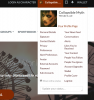
The next step is to click on "Preferences". This will take you into your account preferences where you can control many items that affect your account.
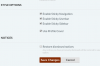
Scroll down to the bottom, here you will see three options.
To begin, hover over your account name in the upper right of the browser window.
The next step is to click on "Preferences". This will take you into your account preferences where you can control many items that affect your account.
Scroll down to the bottom, here you will see three options.
- Sticky Navigation is the white bar that contains links to all of the sections within The Lower World.
- Sticky Userbar contains the links to your account, personal communications, alerts and wallet.
- Sticky Sidebar is located to the right of forum content. This contains various modules of information.