

In wanting to enter an item into the Showcase is only a few short steps.
First is to click on the "Showcase" link within the navigation bar at the top
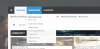
This is the index of the Showcase and what you are looking for is the "Create Item" button which is located on the upper right hand side.
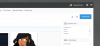
You will then be present with a drop down menu for you to choose which category you want to enter your item into (at this time "Characters" is the only available choice).

Now you will be able to enter in the information for your character. Images can be uploaded by clicking the "Upload Image" button below, this will add the image(s) into the gallery.
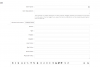
And that's it. We will constantly be looking for ways to improve things here but, the steps will always be the same.
First is to click on the "Showcase" link within the navigation bar at the top
This is the index of the Showcase and what you are looking for is the "Create Item" button which is located on the upper right hand side.
You will then be present with a drop down menu for you to choose which category you want to enter your item into (at this time "Characters" is the only available choice).
Now you will be able to enter in the information for your character. Images can be uploaded by clicking the "Upload Image" button below, this will add the image(s) into the gallery.
And that's it. We will constantly be looking for ways to improve things here but, the steps will always be the same.